Skydio Integration for Milestone XProtect
New in v1.0.1
What's new in v1.0.1
Version 1.0.1 turns the Skydio integration from a video feed into a working drone console inside XProtect.
Mission control
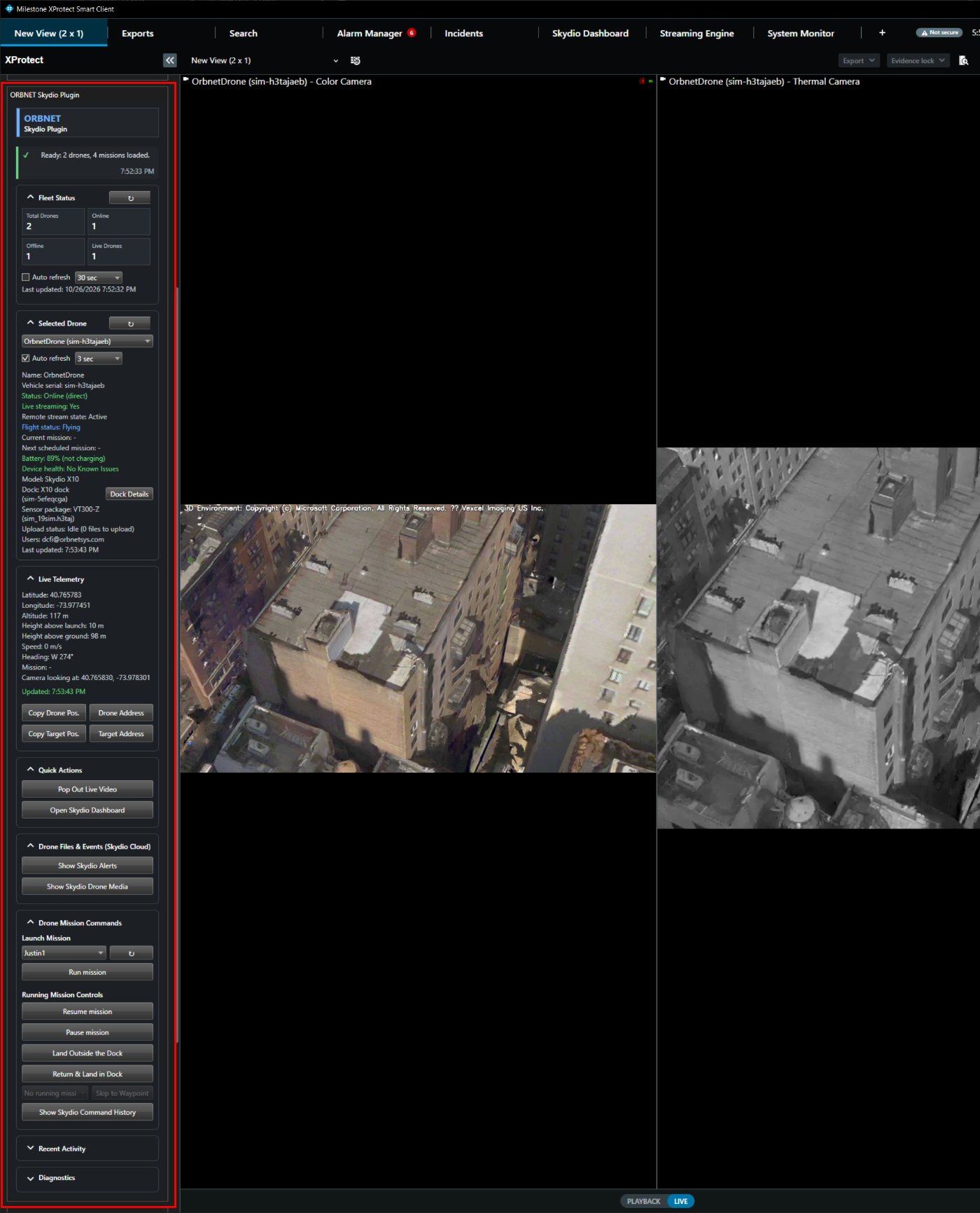
Run missions from your Skydio Cloud library, then pause, resume, skip to a waypoint or land. Every command is confirmed before it is sent.
Skydio Dashboard
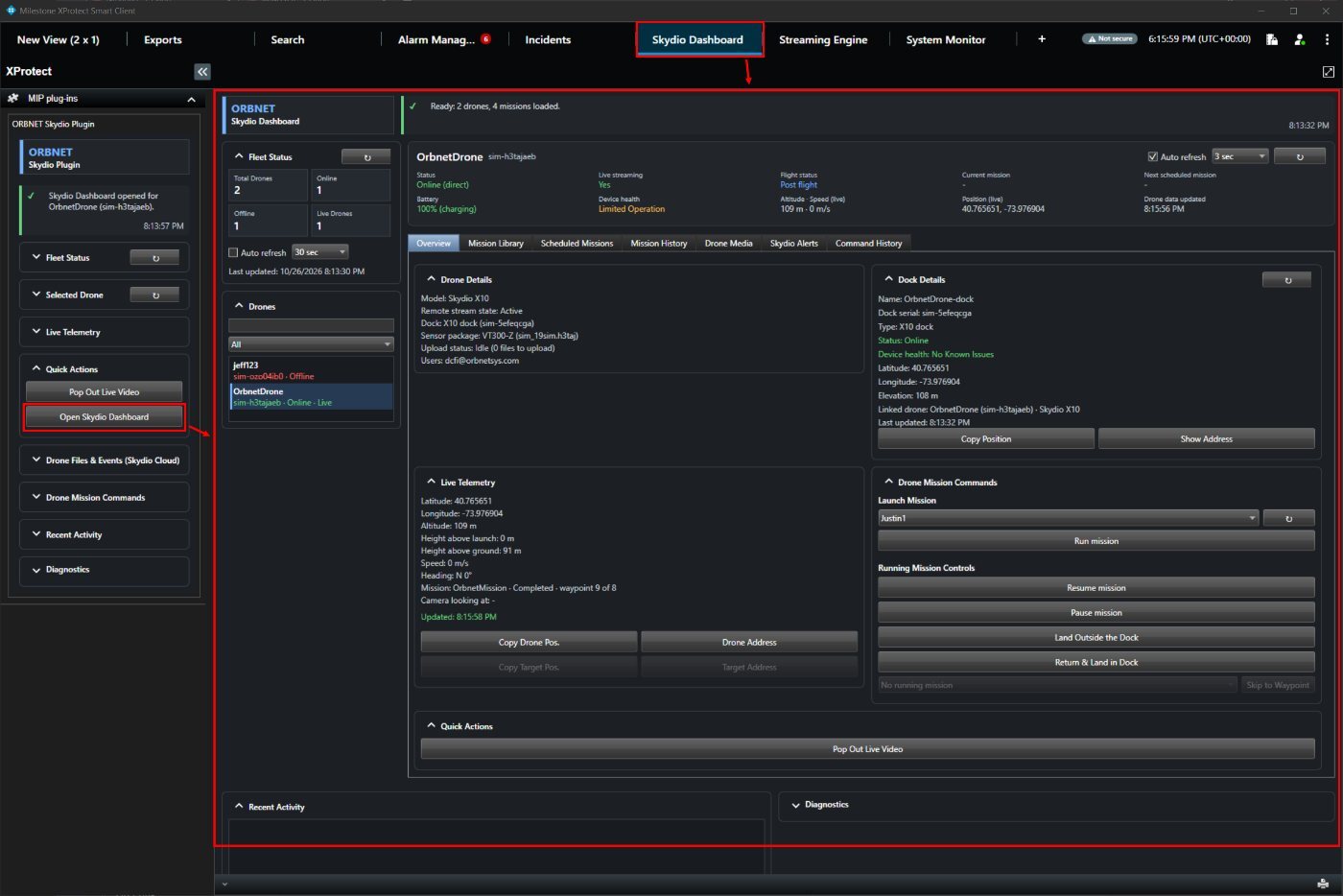
A full Smart Client tab with a searchable drone list, scheduled missions and mission history.
Richer telemetry
Height above launch and ground, heading, mission progress and the camera's target point, alongside position, altitude and speed.
Drone alarms in XProtect
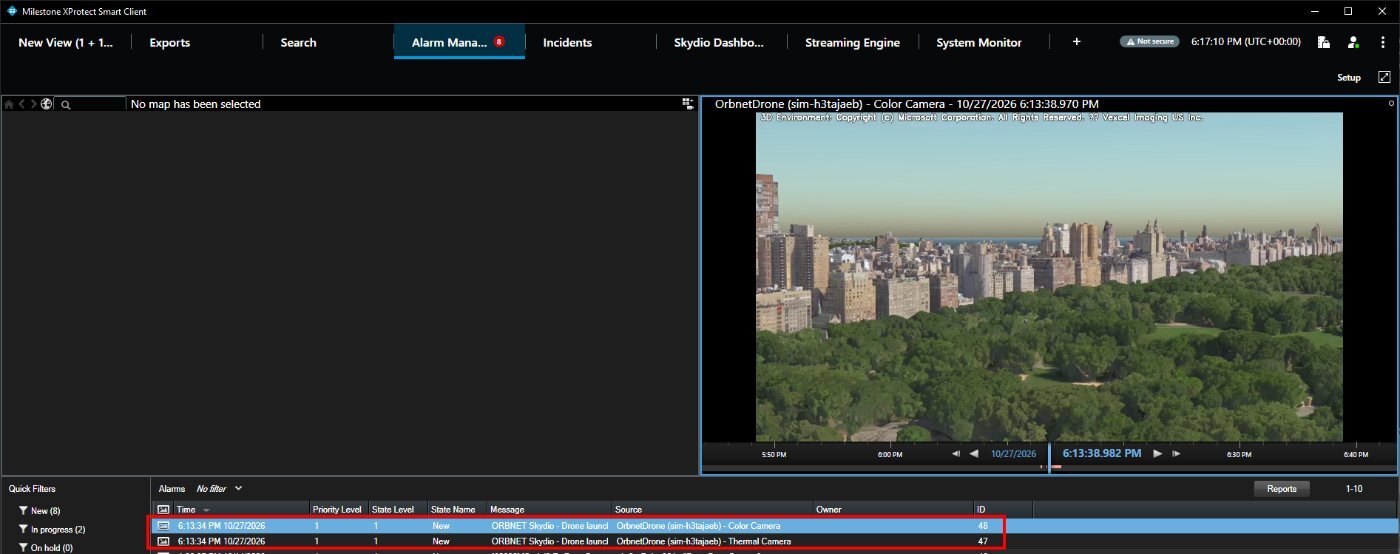
Drone launched and Battery below threshold events, ready for rules and the Alarm Manager.
Dock, alerts and media
Dock status, Skydio alerts, drone media download and command history, without leaving the Smart Client.
Drones Inside Your VMS
Bring live Skydio video, real-time telemetry, mission control and mapping into Milestone XProtect, so aerial assets are handled like every other part of the security estate.
Monitor your fleet, launch missions and respond to drone alarms from within the XProtect Smart Client.
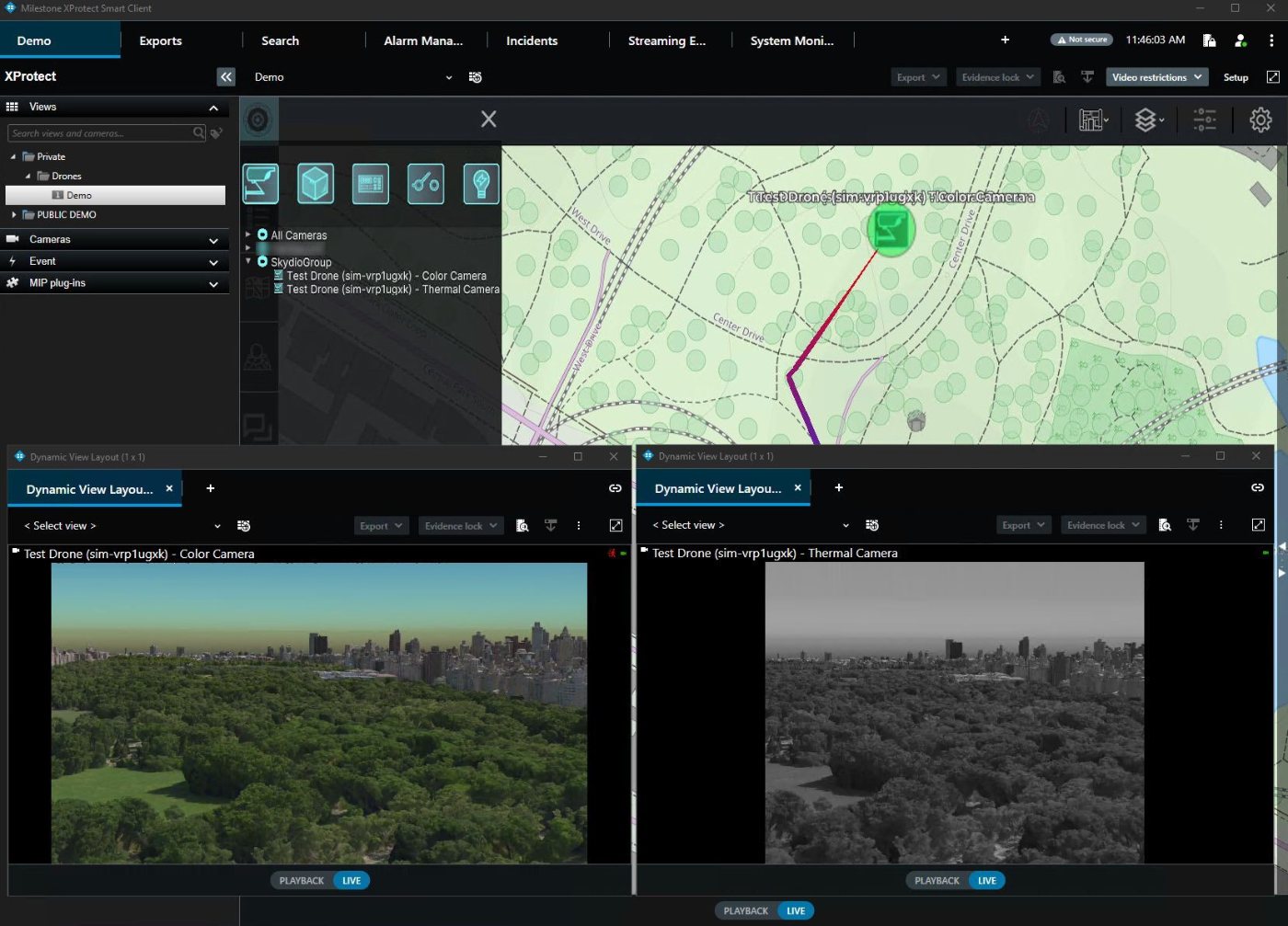
Live Colour and Thermal Video
Mission Control from the Smart Client
Telemetry as Security Metadata
Drone Events for Rules and Alarms
Map-Based Situational Awareness
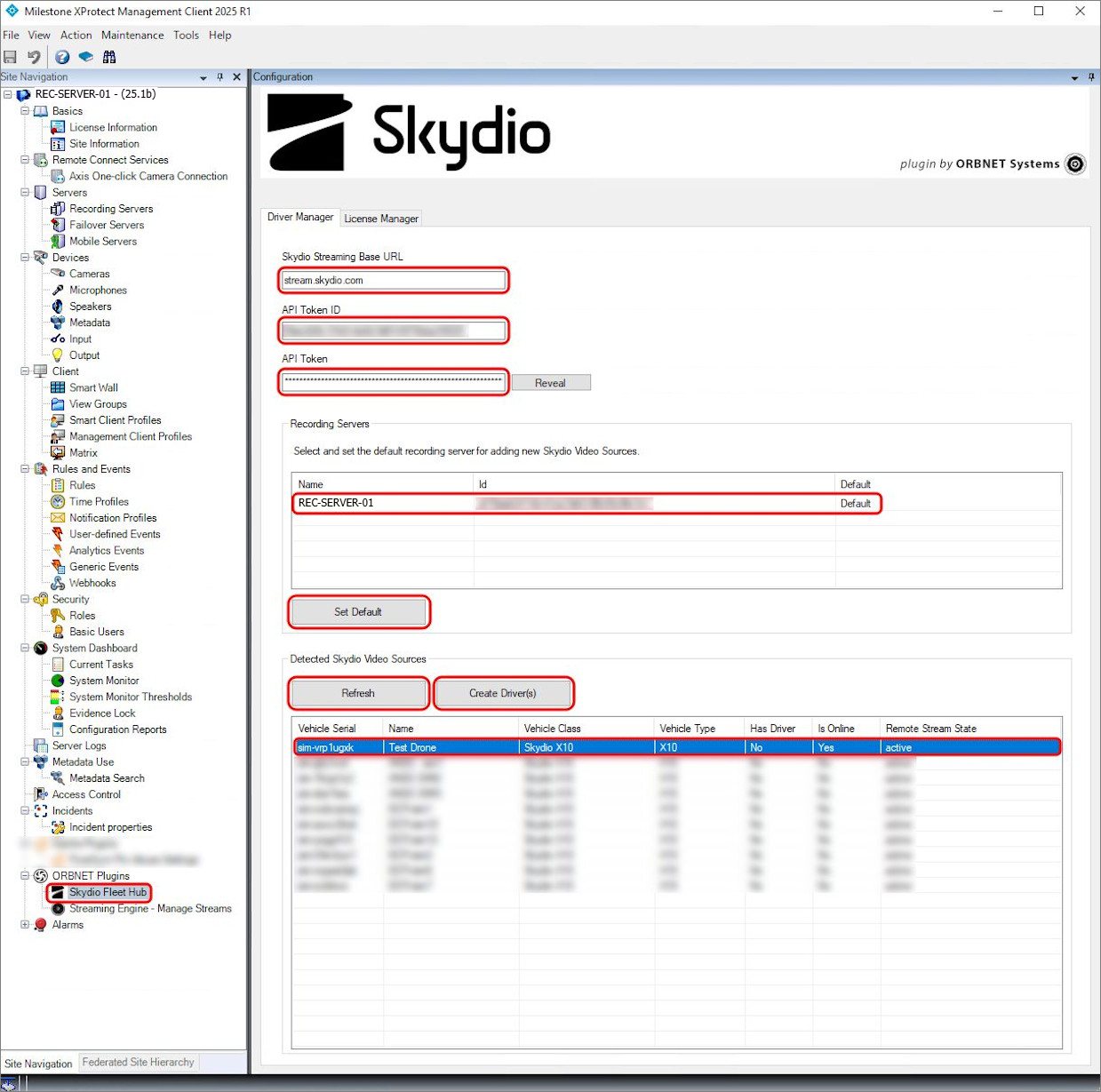
One-Step Drone Discovery
Built for Skydio and Milestone XProtect workflows
Secure Video Streaming
Encrypted end to end: RTSPS video, WSS telemetry, HTTPS API.
Colour and Thermal
Two video channels per drone, plus a telemetry channel.
Mission Control
Run, pause, resume, skip and land, with operator confirmation.
Fleet at a Glance
Fleet status, dock details, alerts and media in one place.
XProtect Events
Drone launch and low-battery events for rules and alarms.
Live Maps Ready
Drones appear on ORBNET Live Maps automatically.
Built Around Secure Drone Video and Metadata
Drone workflows in XProtect
What the Skydio Integration Helps You Do
Bring Skydio drone activity into the same operational environment as your fixed cameras, alarms, maps and wider security workflows.
The goal is simple:
make aerial video, telemetry and mission control useful inside the control room, not trapped in a separate system.
Support Drone as First Responder Programmes
When a docked drone launches, XProtect can start recording and raise an alarm automatically. Operators see the drone's video in the Alarm Manager as it heads to the incident.
View Live Skydio Video in XProtect
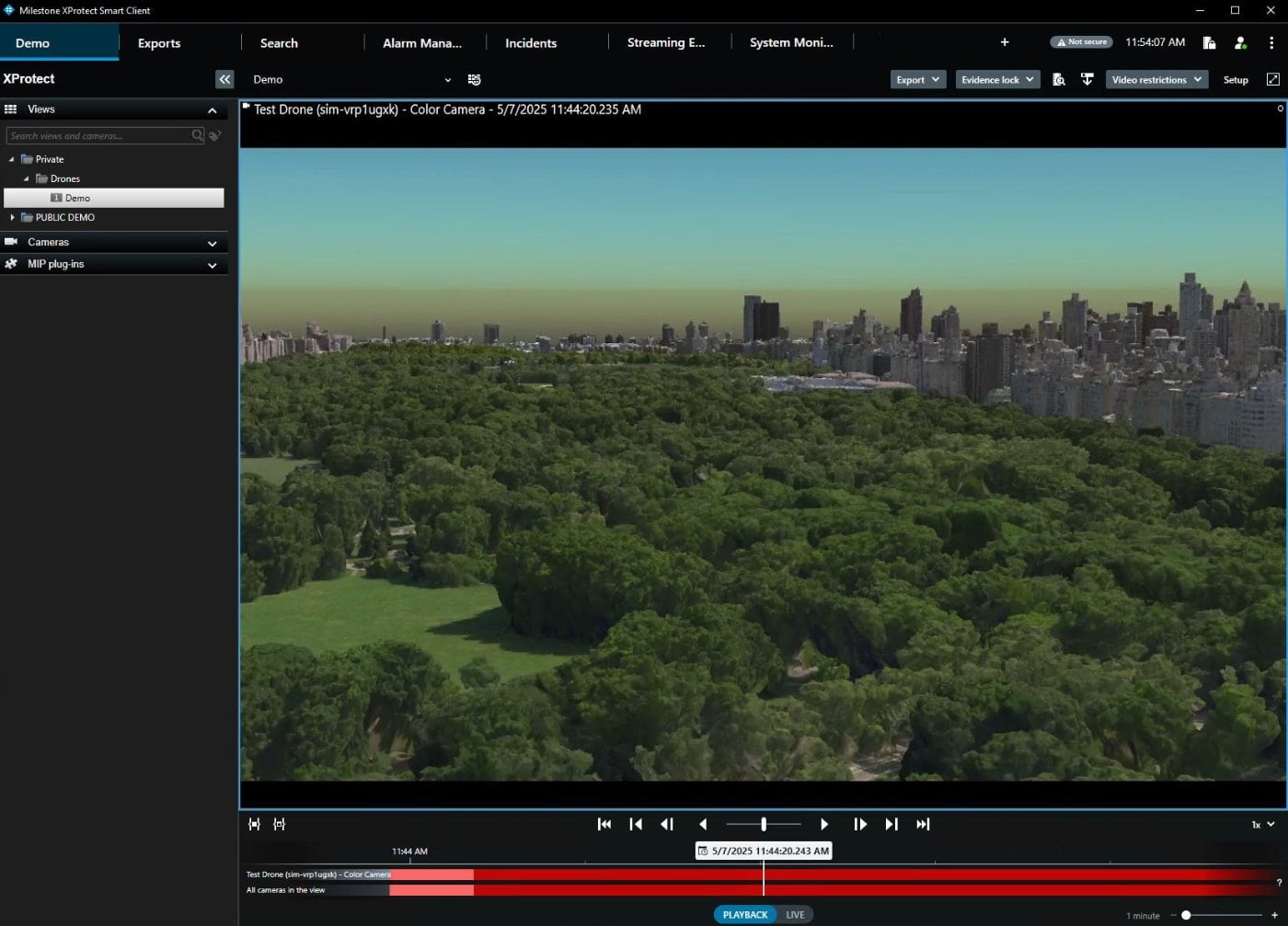
Watch colour and thermal drone video alongside fixed cameras, body-worn and other feeds, with recording and playback under your existing XProtect retention rules.
Task Missions Without Switching Systems
Launch a mission from the Skydio Cloud library, pause it, skip ahead or bring the drone home, all from the Smart Client the operator is already using.
Pinpoint What the Drone Is Looking At
Copy the drone's position or the camera's target point, or look up its street address, and pass it straight to ground teams.
Track Drones on Live Maps
Show drone position and movement on ORBNET Live Maps alongside sites, cameras and incidents, for a single situational picture.
Investigate and Account for Every Flight
Review recorded drone video in XProtect, download drone media from Skydio Cloud, and check the command history and operator log when you need to show who did what.
Drone video and telemetry workflow
How the Skydio Integration Works
Skydio Cloud connects to your XProtect servers through the ORBNET Skydio Driver and Skydio Plugin. Operators work entirely inside the Smart Client.
See it in action
Screenshots
Skydio drones inside the XProtect Management Client, Smart Client and ORBNET Live Maps. Click any image to view it full size.
Security and governance
Secure by Design
Built for police, critical infrastructure and secure sites, where every connection and every command has to stand up to scrutiny.
Encrypted End to End
Every connection to Skydio Cloud is encrypted: RTSPS for video, WSS for telemetry and HTTPS for the API and media downloads.
No API Calls from Workstations
The Smart Client never calls the Skydio Cloud API. Operator requests go through the XProtect Event Server, inside the operator's XProtect session. Only media the operator chooses to download comes directly from Skydio storage, over HTTPS.
Least-Privilege API Token
Only the Event Server and the Recording Server driver use the token. Scope it to the permissions you need, and revoke it in Skydio Cloud at any time.
Full Operator Audit Trail
Every request is logged with operator name, computer, action and result. Mission commands need explicit confirmation before they are sent.
Your Data Stays in XProtect
Video and telemetry are stored only in XProtect, under your recording and retention settings. Component log files are deleted automatically after 30 days.
Privacy-Aware Lookups
Address lookups run only when an operator clicks, and send only the coordinates of that one position.
Requirements and licensing
What You Need
Requirements
- Milestone XProtect 2023 R1 or later
- XProtect Event Server with internet access to Skydio Cloud
- A Skydio Cloud account with at least one drone, and an Org Admin to create the API token
- The Skydio Driver on each Recording Server that will host drones
- The Skydio Plugin on every Management Client, Event Server and Smart Client computer
How licensing works
- ORBNET Skydio licences are priced per drone, covering its colour and thermal channels
- Standard XProtect device channel licences are needed as well, as for any camera
- Licences are tied to your XProtect system and managed in the Fleet Hub License Manager
Try it free for 30 days. The installer includes a full-feature trial for up to five drones (10 video channels). Installers, the integration guide and the feature list are in the ORBNET downloads area, with a free ORBNET account.
Go to downloadsFAQ
Frequently Asked Questions
Which Skydio drones does the integration support?
The integration takes video and telemetry from Skydio Cloud rather than from the drone itself, so it works with the drones in your Skydio Cloud account.
Can operators fly the drone from XProtect?
Operators control missions, not the sticks. They can run a mission, pause, resume, skip to a waypoint, return and land in the dock, or land outside it. Each command needs confirming before it is sent.
Which XProtect versions are supported?
Milestone XProtect 2023 R1 or later.
Do I need extra XProtect licences?
Yes. Each enabled video channel needs a standard XProtect device channel licence as well as the ORBNET Skydio licence, as with any camera.
Do operator workstations need internet access?
Not for the Skydio Cloud API. The Event Server makes those calls for the Smart Client. Workstations only reach Skydio storage directly when an operator downloads drone media.
Which Skydio Cloud permissions does the API token need?
For video and telemetry only: read-only Flight Telemetry, Live Stream, Live Telemetry and Vehicles. The full Smart Client feature set also needs Missions, Docks, Alerts and Media (read-only), plus Mission Schedule and Mission Controls (read and write). The integration guide has the full table.
How quickly do drone events reach XProtect?
The Event Server checks Skydio Cloud every 30 seconds by default, adjustable from 10 to 300 seconds. An event arrives up to one interval after the change.
Can I try it before I buy?
Yes. The installer includes a free 30-day trial with every feature, for up to five drones.
Put Your Skydio Fleet to Work Inside XProtect
See live drone video, telemetry, mission control and alarms running in a real XProtect system. Book a demo with an ORBNET engineer, or start your free trial today.
Book a Skydio Integration Demo Start your free 30-day trial